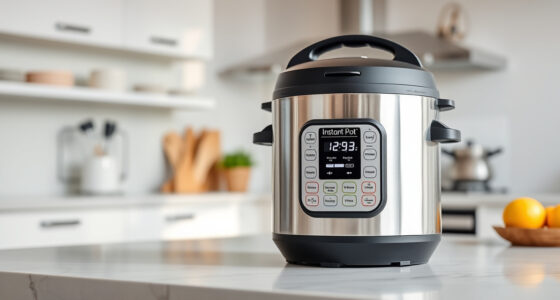

If your Instant Pot 4QT RIO Mini 7-in-1 Multi-Cooker keeps displaying a burn error, it can be frustrating and disrupt your meal prep. This error typically occurs when the cooker detects that food is sticking or burning at the bottom, often due to issues with the ingredients, sealing, or inner pot.

Get kitchen staples and gadgets delivered free — and shop member deals
- Fast, free delivery on millions of items
- Access to Prime Big Deal Days deals on October 6–7
- Prime Video, Amazon Music and more included
Fortunately, most burn errors are fixable with careful troubleshooting. This guide provides clear, safe steps to resolve the problem and get your Instant Pot cooking smoothly again.
Key Takeaways
| Identify cause | Burn errors are usually due to food sticking, insufficient liquid, or sealing issues. |
| Check ingredients | Ensure there’s enough liquid and that ingredients are not too thick or dry. |
| Inspect sealing parts | A damaged or improperly positioned sealing ring or float valve can trigger errors. |
| Clean inner parts | Residue or food buildup can cause burning; regular cleaning helps. |
Step 1: Turn Off and Release Pressure
- Press the cancel button and unplug the Instant Pot for safety.
- Allow the pressure to release naturally or use the quick-release method if safe to do so.
Step 2: Check and Add Liquids
- Open the lid and verify there is enough liquid in the inner pot—typically at least 1 cup for most recipes.
- If the food is thick or dry, add a little water or broth to prevent burning.
Step 3: Inspect the Sealing Ring and Float Valve
- Remove the sealing ring (found in the lid) and check for cracks, tears, or debris. Replace if damaged.
- Ensure the float valve moves freely and is centered properly to maintain a good seal.
Step 4: Clean the Inner Pot and Components
- Wash the inner pot thoroughly with warm soapy water to remove food residue.
- Wipe the lid, sealing ring, and float valve area to clear any buildup.
Step 5: Restart with Proper Settings
- Reassemble the parts, ensuring the sealing ring is properly seated.
- Close the lid securely and set the pressure cooker to cook again, ensuring enough liquid and proper ingredients.
The Products in This Guide

Instant Pot 4QT RIO Mini 7-in-1 Multi-Cooker
- ✔ Model: RIO Mini 7-in-1
- ✔ Capacity: 4 Quarts
- ✔ Functions: 7-in-1

AOZITA Steamer Basket
- ✔ Capacity: Two tiers
- ✔ Material: Stainless Steel
- ✔ Compatibility: 6/8 Qt models
Instant Pot 4QT RIO Mini 7-in-1 Multi-Cooker
The Instant Pot 4QT RIO Mini is a versatile and compact multi-cooker that can sometimes display burn errors due to common issues like low liquid or sealing problems. Following proper troubleshooting steps can resolve these issues quickly and safely.
Pros:
- Compact size fits small kitchens
- Multiple cooking functions
- Easy to clean
- Reliable performance
Cons:
- Burn error can occur if not careful with ingredients
- Limited capacity for larger families
Best for: Small households and quick meals
Not ideal for: Cooking large batches or very thick ingredients
Bottom line: A well-maintained Instant Pot reduces burn errors and ensures smooth cooking.
AOZITA Steamer Basket
The AOZITA Steamer Basket adds versatility to your Instant Pot, allowing for steaming vegetables, eggs, and more. Using a steamer can help prevent burn errors by keeping ingredients elevated from the bottom.
Pros:
- Two-tier design for multiple foods
- Made of stainless steel
- Easy to use and clean
- Fits 6 and 8-quart models
Cons:
- Requires extra space inside the pot
- May need to adjust cooking times
Best for: Steaming vegetables, eggs, and seafood
Not ideal for: For recipes that require direct contact with the bottom heating element
Bottom line: A useful accessory to diversify your Instant Pot cooking and reduce burn risks.
Frequently Asked Questions
Why does my Instant Pot keep giving a burn error?
Common causes include insufficient liquid, food sticking to the bottom, or sealing issues. Follow troubleshooting steps to resolve it.
How much liquid do I need to prevent a burn error?
Typically, at least 1 cup of liquid is necessary, but check your specific recipe and model instructions for best results.
Can I use a different sealing ring?
Yes, but ensure it is compatible with your model and free of damage or food residue for a proper seal.
How often should I clean my Instant Pot parts?
Clean the inner pot, sealing ring, and lid after each use to prevent buildup that can cause burn errors.
Mastering Your Instant Pot for Error-Free Cooking
By following these troubleshooting steps, you can effectively fix a burn error on your Instant Pot and enjoy hassle-free cooking. Regular maintenance, proper ingredient preparation, and the use of accessories like a steamer basket can help prevent future issues, ensuring your multi-cooker remains a reliable kitchen helper.
Affiliate disclosure: As an Amazon Associate we earn from qualifying purchases. Prices and availability are accurate as of the time of publishing.
NFL season / tailgating Picks
team gear
As an affiliate, we earn on qualifying purchases.